
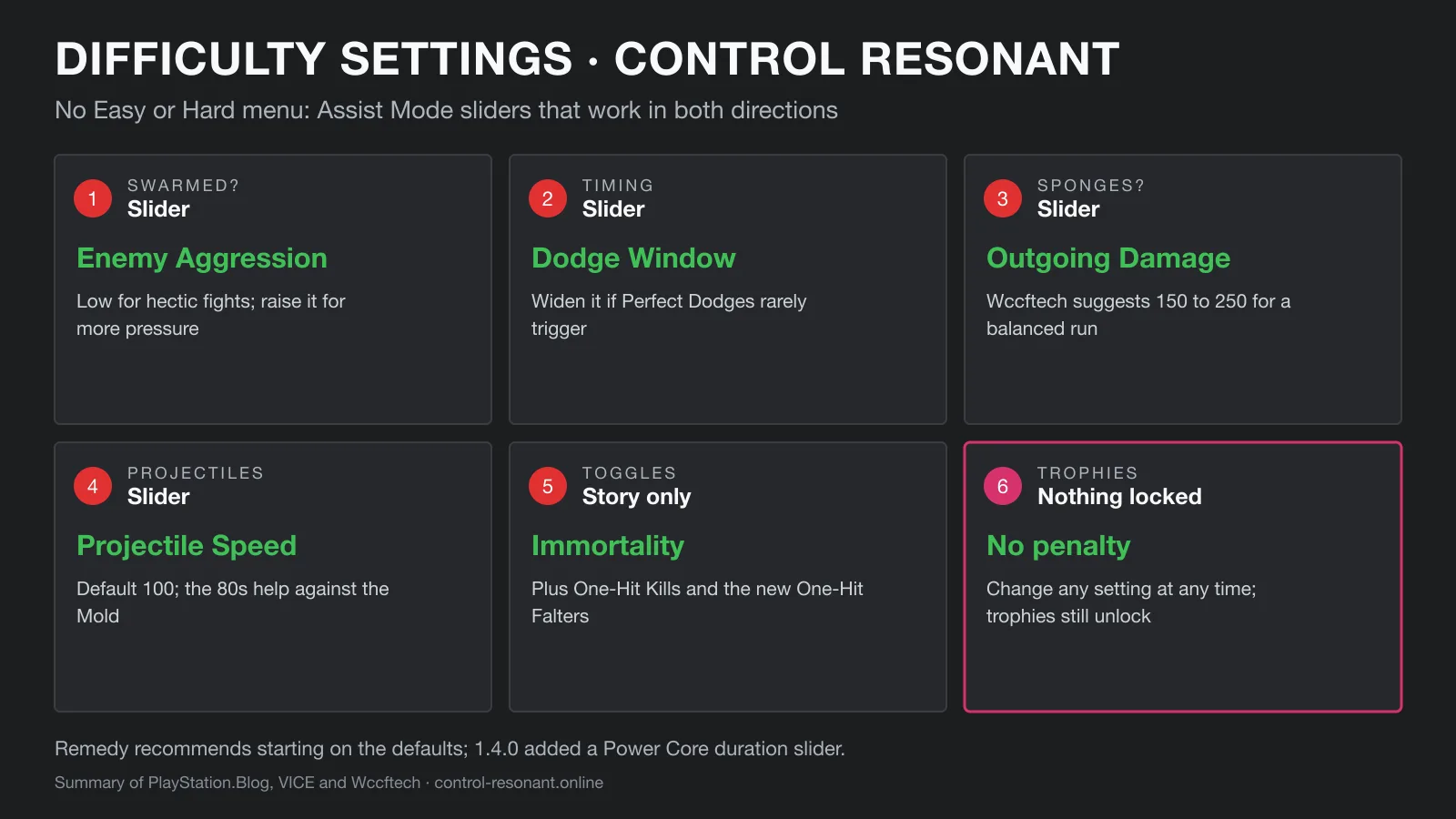
Is there an Easy mode?
No, and that is deliberate. Remedy’s lead gameplay designer Sergey Mohov explains on PlayStation.Blog that instead of one overall difficulty, you change the specific parts of combat that are not working for you: “we’d much rather you adjust the rules and keep playing than put the controller down and stop.”
The game does not ask you to pick anything before your first run, so everyone starts on the intended combat. Assist Mode can be switched on or off at any point. VICE suggests trying the defaults until the first boss near the end of the tutorial before deciding.
Launch-week complaints about tanky enemies were partly addressed by patches rather than settings: hotfix 1.3.3 lowered enemy health and 1.4.0 cut Unknown Zone combat by 10–15%. If you are deciding whether the game is too punishing, read is Control Resonant a soulslike?
Every Assist Mode option
| Option | What it changes | Turn it down/up if… |
|---|---|---|
| Enemy Aggression | How often and from how many directions enemies attack | You keep getting hit from behind (Low) — or want more pressure |
| Perfect Dodge Window | How forgiving dodge timing is | Perfect Dodges rarely trigger (widen it) |
| Enemy Projectile Speed | How fast ranged attacks travel | Mold projectiles are hard to read |
| Incoming Damage | Damage Dylan takes | You die in a few hits |
| Outgoing Damage | Damage Dylan deals | Fights feel like damage sponges |
| Outgoing Falter | How fast enemy posture breaks | Heavies never stagger |
| Power Recovery Speed | How fast Power refills for abilities | You are always out of Power |
| Power Core Charge Duration | Multiplier from 100% to 300% (added in 1.4.0) | Power Core buffs run out too soon |
| Enhanced Melee Magnetizing | How much melee attacks pull you onto targets | Your swings miss moving enemies |
| Immortality | Dylan cannot die | You only want the story |
| One-Hit Kills | Every hit kills | Skip combat entirely |
| One-Hit Falters | Every hit staggers (new in Resonant) | You want executions on demand |
Options from PlayStation.Blog and VICE; the Power Core slider is from the 1.4.0 patch notes. Remedy published no numeric ranges for the other sliders.
Presets: PlayStation.Blog confirms a set of presets, each built around a play style, that you can fine-tune afterwards, but does not name them. Fan guides list Field Agent (story first, combat rarely dangerous), Strategist (fast and lethal for both sides) and Ranger (tankier, less damage), plus Custom; one fan wiki lists only three, so check the in-game screen.
How to make Control Resonant harder
This is the big change from the first Control, where the sliders could only make the game easier. In Resonant they work in both directions. Remedy’s own examples:
- Raise Enemy Aggression.
- Shrink the Perfect Dodge Window.
- Increase Incoming Damage.
Lowering Outgoing Damage or Outgoing Falter makes fights longer as well. For a harder run with better rewards, New Game+ is the other route — and since 1.4.0 you can repeat it as many times as you like.
Recommended settings
Start on the defaults and change one thing at a time. Wccftech’s suggestions for a balanced run:
- Outgoing Damage 150–250 if enemies feel like health sponges — faster fights that still need attention.
- Enemy Projectile Speed in the 80s (default 100) if Mold ranged attacks keep catching you; much lower and you can simply walk out of the way.
- Enemy Aggression: Low for hectic group fights and for World Events such as Hold the Line and Firebreak, where officers get attacked less often.
Artifacts are the other lever. Heart Monitor, Worn Eraser and 1996 Commemorative Coin make the early game far more forgiving without touching Assist Mode — see best Artifacts.
Where to find Assist Mode
Open the pause menu, go to the last tab on the right, open Options and find Assist Mode under General (Wccftech). Other guides give the path as Options → Gameplay → Assist Mode. One fan guide notes that settings are stored per save slot, so check them if you switch saves.
Trophies and achievements
Nothing is locked. PlayStation.Blog states that no trophies or achievements are gated behind Assist Mode, and Wccftech confirms they still unlock with it on. Change the sliders as often as you like.
Difficulty settings FAQ
Does Control Resonant have difficulty settings? Not as an Easy/Normal/Hard menu. Difficulty is handled by Assist Mode, a set of presets and individual sliders for things like enemy aggression, incoming and outgoing damage, the Perfect Dodge window and Power recovery. You can change them at any time.
Can you make Control Resonant harder? Yes. Unlike the first Control, the Assist Mode sliders work in both directions: Remedy’s examples are raising enemy aggression, shrinking the Perfect Dodge window and increasing incoming damage.
Does Assist Mode disable trophies? No. PlayStation.Blog says no trophies or achievements are gated behind Assist Mode, and Wccftech confirms trophies still unlock while it is on.
Where is Assist Mode in Control Resonant? Open the pause menu, go to the last tab on the right, open Options and find Assist Mode under the General category (Wccftech). Other guides describe it as Options → Gameplay → Assist Mode, so the tab name may differ by platform or version.
What Assist Mode settings should I use? Start on the defaults, as Remedy and reviewers suggest, and change only what is causing trouble. If fights feel like damage sponges, Wccftech suggests Outgoing Damage around 150–250; if Mold projectiles are the problem, lower Enemy Projectile Speed into the 80s; if you get swarmed, set Enemy Aggression to Low.
Sources
- PlayStation.Blog — Play your way with Control Resonant’s expanded Assist Mode
- VICE — Control Resonant Difficulty Settings Explained
- Wccftech — CONTROL Resonant: Best Assist Mode Settings for a Balanced Playthrough
- MP1st — Control Resonant Version 1.4 (full patch notes, October 1, 2026)
- Remedy on Steam — Hotfix 1.3.3: enemy health, Falter and Dylan’s combat strength (September 24, 2026)
Related guides
 Official · RemedyGuidesIs Control Resonant a Soulslike? Combat and Difficulty ExplainedRead guide
  DiagramGuidesControl Resonant Best Artifacts and BuildsRead guide
  Official · RemedyGuidesControl Resonant: All You Need To KnowRead guide
  DiagramGuidesControl Resonant Update 1.4 Patch Notes, ExplainedRead guide